 PEURO
01 / 03
IN PERSONPhysical store
Request payments through Mobile cashier operations or integrate with your point-of-sale system. Show the QR and track payment status.
Mobile / cashierPhysical POS
From a physical checkout counter to your online store: create payment requests, share a QR code or payment link, and follow collection through Peuro Pay’s merchant experience.
Opens the official Konebe Wallet app. Merchant configuration and availability depend on activation.
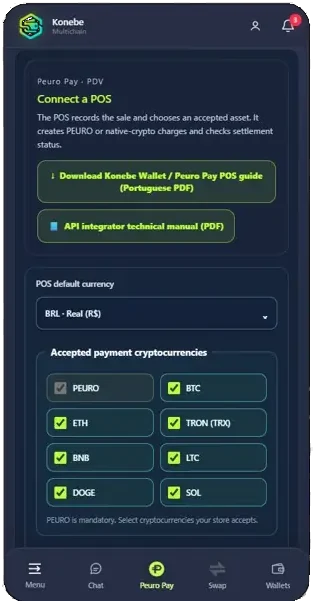
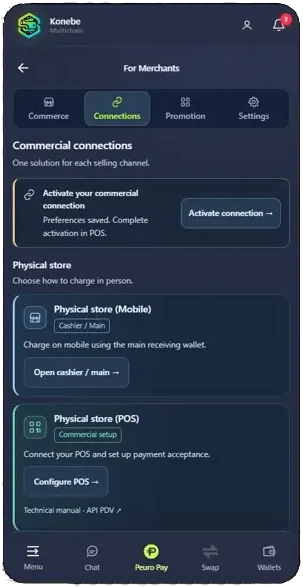
Official merchant configuration interface in Konebe Wallet.
Peuro Pay connects the merchant’s payment request to crypto payment options, with different configurations for counters, e-commerce and simple websites. Choose the experience that fits your infrastructure.
Request payments through Mobile cashier operations or integrate with your point-of-sale system. Show the QR and track payment status.
Connect your server through the POS API or use hosted checkout. Depending on the mode, your store or your buyer can select the enabled crypto asset.
Embed Easy Checkout 3.0 with a public widget ID. It supports fixed-amount payments or donations, subject to authorized merchant configuration.
Merchants select the mode in their authorized commercial connection. Assets and settlement conditions depend on configuration.
The cryptocurrency paid by the buyer is received at previously authorized merchant-wallet addresses. Network and connection restrictions still apply.
The incoming crypto payment is verified and processed for settlement in PEURO, subject to configured service fees, availability and limits.
PEURO, BTC, ETH, TRX, BNB, LTC, DOGE and SOL — subject to asset availability and merchant connection settings.
BRL · EUR · USD · PEUR
Important: BRL, EUR, USD and PEUR may be commercial pricing currencies. This does not mean automatic fiat deposits to a bank account.
Open Konebe Wallet, select your commercial receiving mode and activate an authorized merchant connection.
Create a request at the checkout counter or from your server; share the appropriate QR code, link or checkout.
The customer pays with the stated asset and network. The service tracks the required statuses and confirmations.
Only a legitimate financial paid status verified through the authorized backend should trigger automatic fulfillment.
Official Konebe Wallet screens showing the Peuro Pay experience. Displayed amounts are interface captures, not live quotes or proof of a live production transaction.
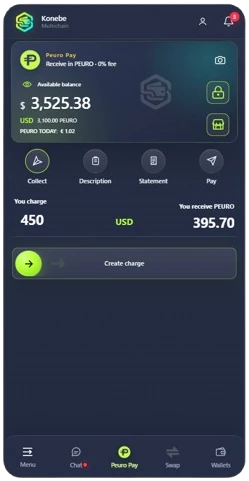
The merchant defines the amount and opens a payment request.
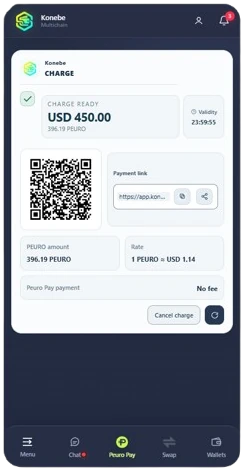
The customer receives payment instructions with the correct asset and network.
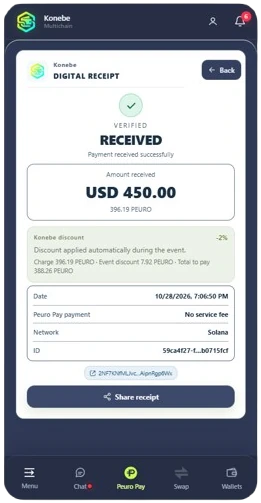
The merchant checks the receipt and order status.
The official KONEBE V2.35 documentation defines two merchant APIs and three checkout experiences. Integration requires an active commercial connection and the appropriate security model.
/api/merchant-pdvFor physical POS and direct e-commerce connections. The merchant server selects the asset, creates the request and checks its status.
Open official technical manual (PDF) ↗/api/merchant-pdvThe store selects the crypto asset and sends the customer to a hosted payment page. Uses the POS API.
Open official technical manual (PDF) ↗/api/merchant-checkoutThe store supplies the amount and the customer selects an enabled crypto asset in hosted checkout. Requires a backend.
Open official technical manual (PDF) ↗/api/merchant-checkoutHTML-embedded payment widget that does not require the merchant to operate a backend, using a public widget ID.
Open official technical manual (PDF) ↗Merchant APIs are operated within the Konebe ecosystem; this landing page does not create charges or process payments. Merchant credentials stay on an authorized server.
Displaying a QR code, opening checkout or presenting a transaction hash is not proof of financial settlement.
Your system should check an authorized status and release orders only after the backend confirms paid.
Never expose a POS key in HTML, public links or QR codes. The widget uses a public identifier only.
Merchant configuration determines permitted addresses, assets and limits; buyers cannot change the receiving wallet.
Documented converted-settlement limits: minimum equivalent to 1 PEURO and configurable cap up to 10,000 PEURO per request. Fees are defined by the service. Direct receipt has its own technical controls.
Peuro Pay is Konebe’s crypto payment collection solution for merchants, including QR codes, payment links, cashier operations, POS, APIs and hosted or embedded checkouts.
Mobile cashier operations and some merchant flows do not require your own backend. Direct API and Checkouts 1.0 and 2.0 need a backend. Checkout 3.0 provides an embed for sites without one.
Official manuals document PEURO, BTC, ETH, TRX, BNB, LTC, DOGE and SOL. Actual asset and network availability depends on the enabled merchant connection.
A converted PEURO settlement mode exists, subject to verification, fees and limits. Direct receipt in the original crypto asset is also documented.
No fiat bank settlement is promised. BRL, EUR and USD may be commercial pricing currencies, not automatic bank deposits.
Only an authorized backend-confirmed financial paid status should trigger automatic fulfillment. QR displays, screenshots and standalone transaction hashes are insufficient.
Open Konebe Wallet, configure Peuro Pay merchant options, select assets and settlement mode, save your preferences and activate the authorized connection.
Explore Peuro Pay in Konebe Wallet, choose the right merchant setup and read the official integration guides.